

Service and Maintenance
Plan maintenance instead of reacting
Every unit shows the remaining operating hours until service, the filter condition, and decoded error and warning codes with recommended action. The service page sums this up for the whole site, most urgent unit first.
The service page
The whole site, sorted by urgency
An overall status as a traffic light sums it up: “All good”, “Service required soon” when a unit is due within 14 days or 336 operating hours or has a warning, and “Service overdue” when a unit is overdue or reports an error.
Below that, the key figures total devices, online, due soon, and overdue, and the fleet table: device with status (if offline: since when), hours until service, active error and warning codes as badges with plain language on hover, operating hours, filter cleanings, product, and direct link.
- Codes from devices that have been offline for more than seven days are marked as “possibly outdated”.
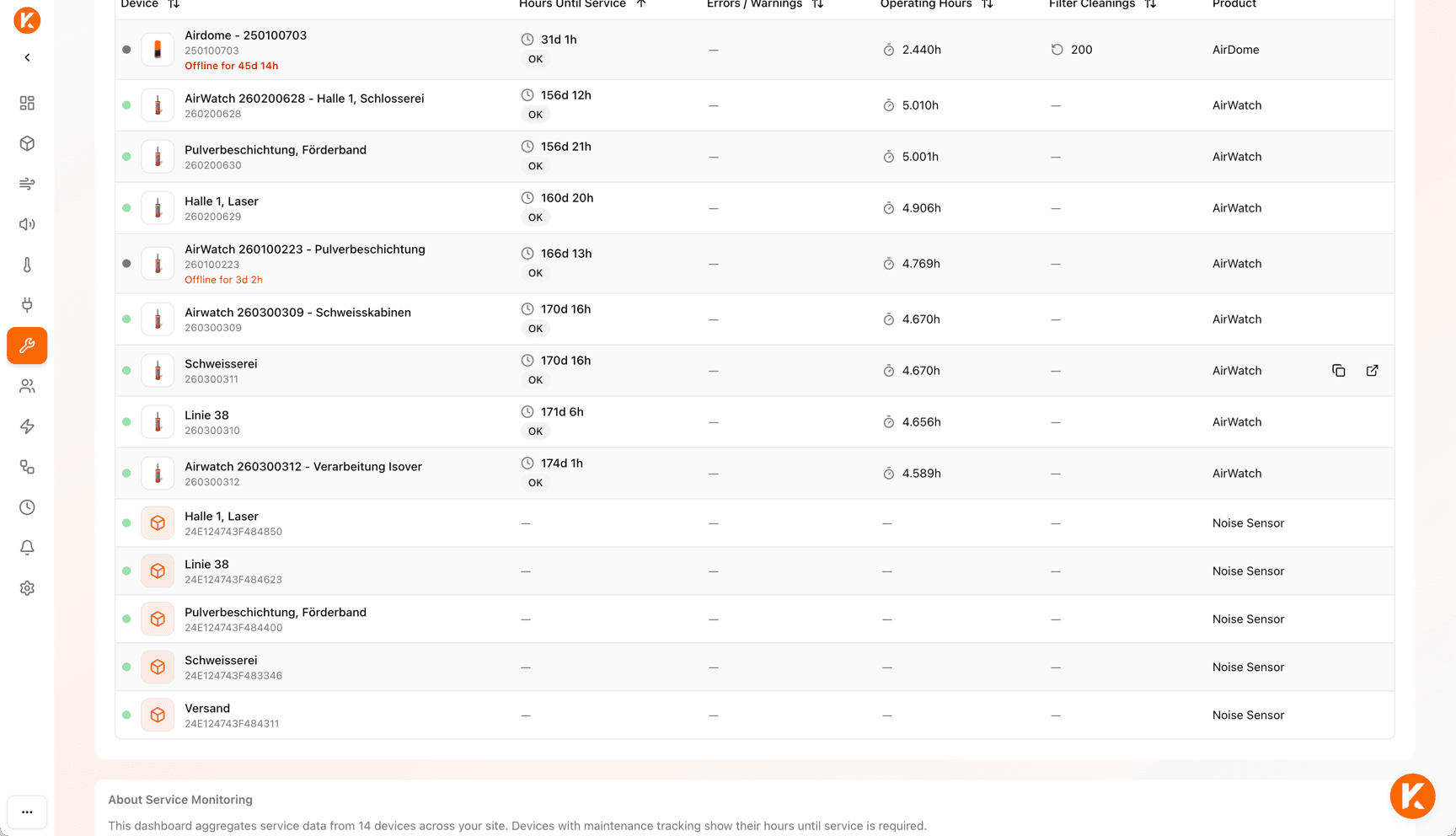
Service countdown
Operating hours instead of a calendar
Extraction and filter units count their operating hours until the next maintenance. The device dashboard shows remaining and elapsed hours as a progress bar in traffic light colors; at 90 % of the interval, the notice “Service recommended soon” appears.
At the top of the device page, the notice “Service required soon” appears from seven days of remaining runtime, or “Service overdue”. On the VacuFil 125 and MaxiFil Clean, the filter pressure additionally shows how full the filter is.
Error and warning codes
In plain language, with cause, impact, and recommendation
For filter units with native connection or KEMPER Connect Bridge, KEMPER Connect decodes the machine’s error and warning registers. Instead of a number, it says for example: “Volume flow too low (IFA signal): capture of hazardous welding fumes is no longer guaranteed; remove blockages and replace the filter if necessary.” IFA is the German Social Accident Insurance institute whose requirements this signal follows.
Errors appear in red, warnings in yellow, each on the device dashboard, in the asset list, on the service page, and in the service report. Many warnings are early stages of an error: on the CleanAirTower, missing compressed air is first reported as a warning, with a recommended action including the pressure figure, before it becomes an error.
- Bridge machines use a uniform catalog: ten errors, eight warnings, including the IFA-relevant signal “Volume flow too low”.
- For “Airflow control error” and “Airflow too low”, the CleanAirTower SF 9000 names the clogged disposable filter as the typical cause and recommends replacing the filter.
- “Contact support” is available directly from the error message.
Service report
From the overview to the request to the service partner
- 1
Download report
The service report as CSV (Excel-compatible) contains all devices with status, hours until service, operating hours, and error and warning codes including description.
- 2
Send email
“Send email” downloads the report and opens a pre-written email with a summary.
- 3
To the KEMPER service partner
The email can go directly to the service partner, who sees at a glance which units need what.
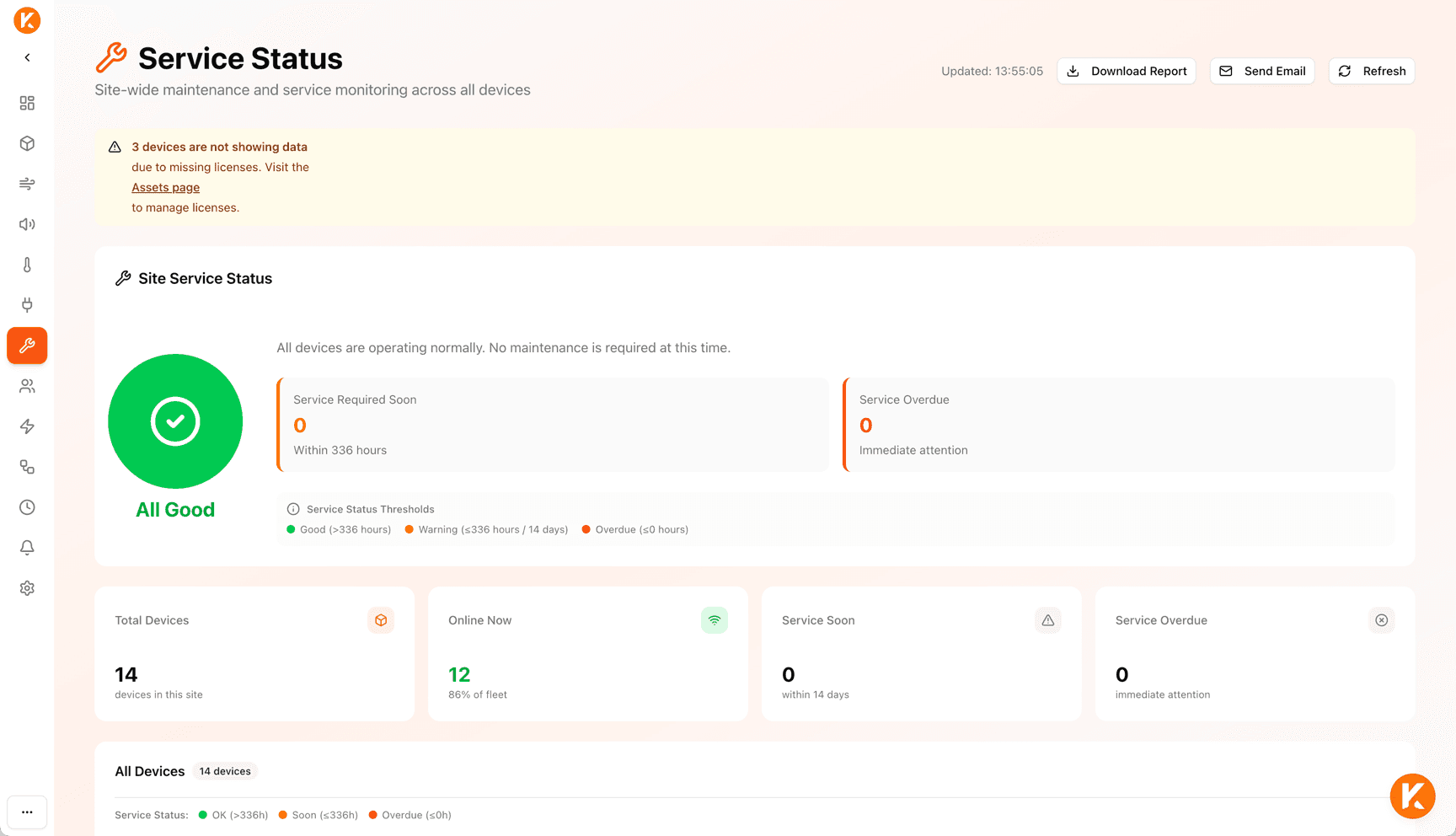
Good to know: two warning periods
The dashboard of a unit warns from seven days (168 operating hours) of remaining runtime. The service page and the site overview report “Service required soon” already from 14 days (336 operating hours), so that maintenance can plan earlier.
The service report is a CSV file with a pre-written email, not a PDF. The service page lists all devices on the site; the maintenance countdown and error codes are available for the extraction and filter units. On the VacuFil 125 and on units connected through the KEMPER Connect IoT Kit, error codes are shown as a number.
Related
KEMPER Connect Bridge
Retrofit existing units with service countdown and error codes in plain language.
AirDome
Service due, filter cleanings, and error messages on the dashboard.
CleanAirTower
Compressed air warning before the error, filter replacement notice on the SF 9000.
Reports and exports
All reports and exports at a glance.
Know which unit needs service next.
We show you the service page and the report on your own units.